Track Review Requests
See which review requests went out, when customers opened them, and who clicked through.
Check how many review requests you have sent and whether customers acted on them. Requests lists every request in the selected time period, with its sent and engagement dates. Nothing on this page sends or resends: it reports what already happened.
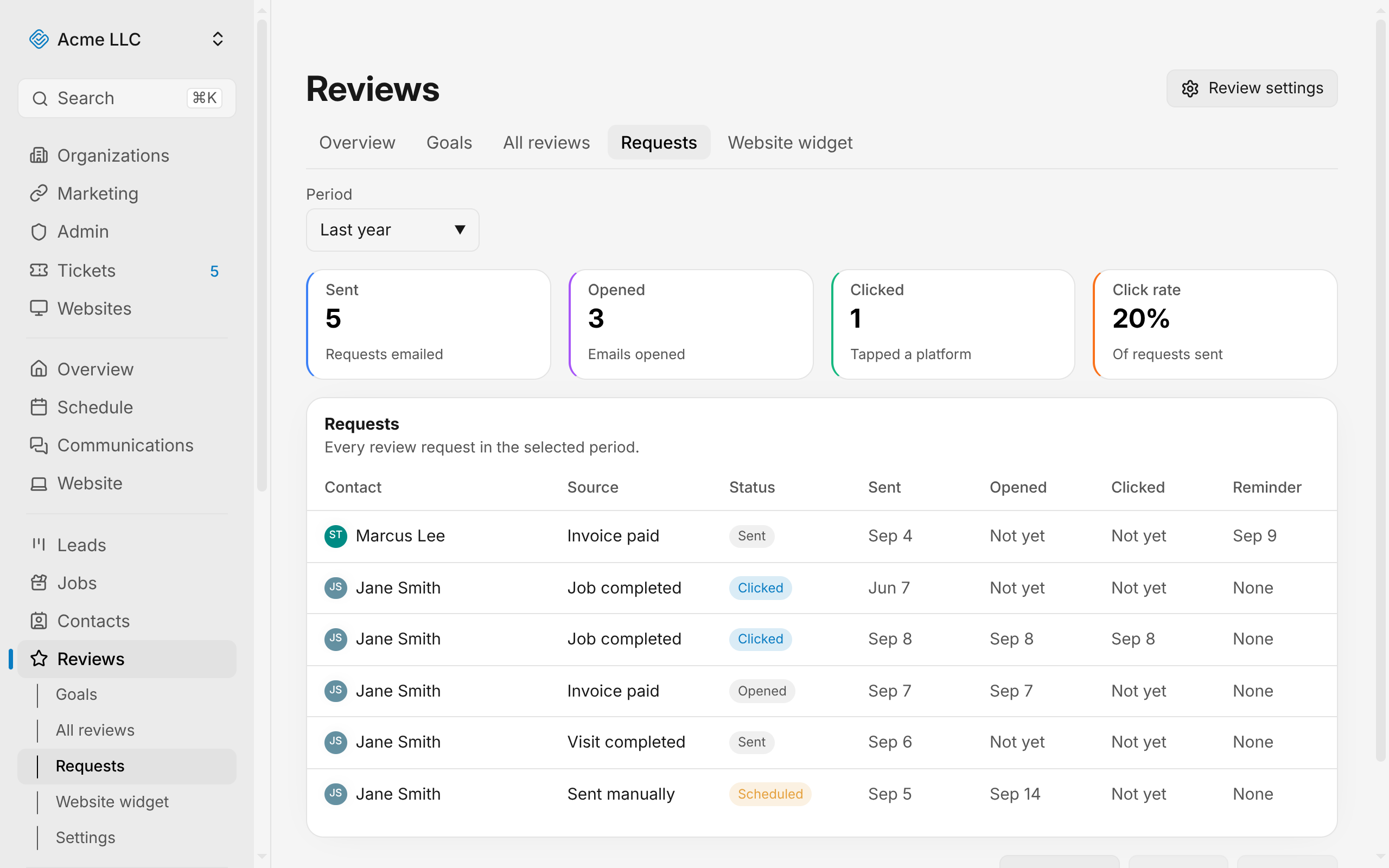
View the request summary
The top of the Requests tab displays four figures for the selected time period:
- Sent: Total requests emailed.
- Opened: How many customers opened the email.
- Clicked: How many customers tapped a link to a review platform.
- Click rate: The percentage of sent requests that were clicked.
These same four figures appear on the Introduction to Reviews overview card under Request Funnel, also limited to the last 30 days.
Change the time period
The Requests tab defaults to 30 days, but you can view requests over longer windows.
- Open the Period dropdown at the top left.
- Choose Last 30 days, Last 90 days, or Last year.
The table and the four summary figures refresh to match the new window.
Read the requests list
The table shows each request as a row. Click a contact's name to open their profile.
The columns are:
- Contact: The recipient's name.
- Source: What triggered the request (see "What each source means" below).
- Status: The request's current state (see "What each status means" below).
- Sent: The date the email went out, or a note if it's scheduled to send later or never sent.
- Opened: The date the customer opened the email, or "Not yet" if they haven't.
- Clicked: The date the customer clicked a platform link, or "Not yet" if they haven't.
- Reminder: The date a reminder was sent, or "None" if no reminder has gone out.
What each source means
The Source column names what caused the request to go out:
- Sent manually: You created the request by hand.
- Invoice paid: The request was triggered when an invoice was marked paid.
- Job completed: The request was triggered when a job was marked complete.
- Visit completed: The request was triggered when a recurring visit was completed.
What each status means
The Status column shows the request's state:
- Scheduled: The request is queued to send later. The Sent column shows "Due [date]".
- Not sent: The request was never emailed. The Sent column shows "Not sent".
- Sent: The email was delivered. The Sent column shows the date.
- Opened: The customer opened the email. The Opened column shows the date.
- Clicked: The customer opened a link to a review site. The Clicked column shows the date.
- Failed: The request failed permanently after send.
Related Guides
- Set Review Goals Create a goal for your total reviews, see your progress, and watch your monthly pace.
- Add Reviews to Your Website Build a reviews widget, customize its look, copy the embed code, and paste it on your site.
- Introduction to Reviews Manage customer reviews from Google, reply to them, and track your ratings.
Still Need Help?
If an article did not cover it, send us a message and a real person will get back to you.